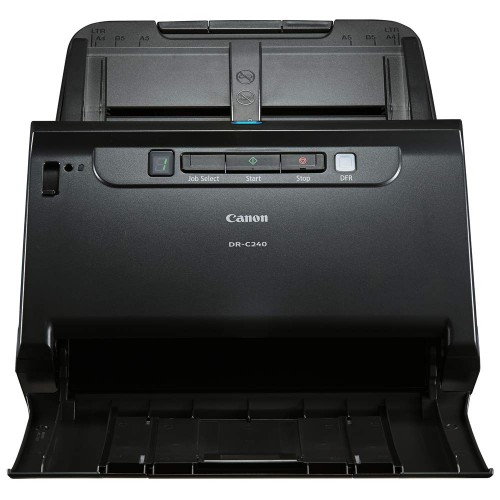
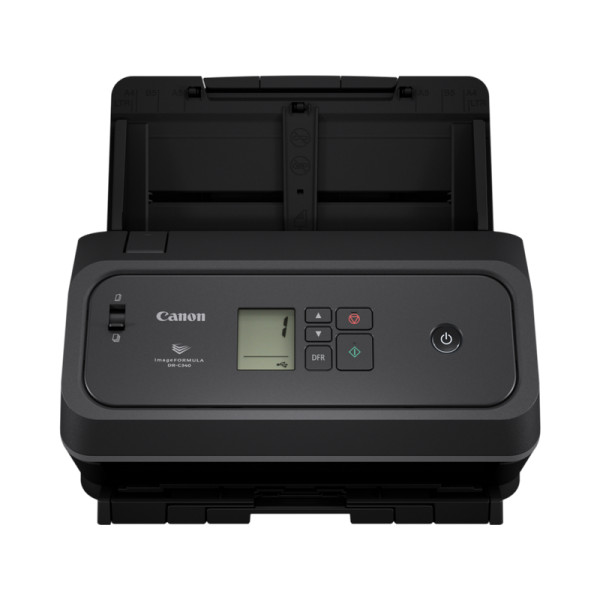
Canon ImageFormula DR-C340 Document Scanner
Exclusive of all taxes
Product Details
Key Features
High-Speed Duplex Scanning: Scans both sides of a sheet at up to 40 ppm (80 ipm) in black and white or colour, perfect for busy offices.
Robust USB-C Connectivity: Supports USB 3.2, 3.1, 3.0 and 2.0 via a Type‑C connector for fast data transfer and versatile device compatibility.
Large Capacity Feeder: Holds up to 100 A4 sheets, reducing the need for frequent reloading during high‑volume jobs.
Extended Document Length: Long Document Mode handles sheets up to 6,096 mm, ideal for scanning blueprints or large invoices.
Precise Colour and B&W Scanning: Delivers 600 dpi optical resolution with RGB LED lighting for crisp colour and sharp black‑and‑white images.
Advanced Image Processing: Features OCR, barcode/2D code recognition, deskew, background smoothing and colour correction to produce ready‑to‑use digital files.
Special Card Scanning: Dedicated modes for business cards, plastic cards and passports, including embossed card support and carrier‑sheet scanning.
Automatic Document Handling: Auto colour detection, page size detection, resolution setting and double‑feed detection ensure smooth, error‑free runs.
Energy Efficient Operation: Runs on standard AC 220‑240 V (50/60 Hz) with low power consumption thanks to LED illumination.
Durable Build: Compact dimensions (283 × 223 × 218 mm) and a solid 3.2 kg chassis provide stability on any workstation.
Type | Desktop type double-sided sheet fed scanner |
Scanning Sensor Unit | CIS |
Optical Resolution | 600 dpi |
Light Source | RGB LED |
Scanning Side | Front/ Back/ Duplex |
Supported Interfaces | USB 3.2 / USB 3.1 / USB 3.0 / USB 2.0 (Connector type: Type-C) |
Dimensions (WxDxH) Tray closed | 283 x 223 x 218 mm |
Weight | 3.2 kg |
Power Requirements | AC 220 – 240V (50/60Hz) |
Black and White Speed | 40 ppm / 80 ipm (200 dpi / 300 dpi) |
Colour Speed | 40 ppm / 80 ipm (200 dpi / 300 dpi) |
Suggested Daily Volume | 4,500 to 7,000 scans/day |
Document Width | 50 – 216 mm |
Document Length | 54 – 356 mm |
Document Thickness | 27 g/m2 – 413 g/m2 (0.04 – 0.49 mm) |
Long Document Mode | Up to 6,096 mm |
Business Card Scanning | Width: 50 – 55 mm / Length: 85 – 91 mm / Thickness: 128 – 255 g/m2 (0.15 – 0.3 mm) |
Plastic Card Scanning | Width: 86 mm / Length: 54 mm / Thickness: 1.4 mm or less (Embossed card supported) |
Passport Scanning | Up to Thickness 6.0 mm (with carrier sheet) / 4.0 mm (without carrier sheet) |
Feeder Capacity | 100 sheets (A4) |
Special Features | Ultrasonic Double Feed Detection, Auto Colour Detection, Skip Blank Page, Auto Page Size Detection, Auto Resolution Setting, Text Orientation Recognition, Barcode/2D Code Recognition, OCR Recognition, Batch separation, Active Threshold, Text Enhancement (I/II), Deskew, Double Feed Release, Prescan, 3-Dimensional, Colour Correction, Prevent Bleed-Through/Remove Background, Background Smoothing, Character Emphasis, Colour Dropout/Enhance (RGB), MultiStream Function, Adjustable Gamma Settings, Moire Reduction, Folio Mode, Reduction ratio adjustment, B&W Contrast, Reverse Image, Rapid Recovery System |
Warranty | 01 YEAR |
Description
Canon ImageFormula DR-C340 Document Scanner
Key Features & Benefits:
- High-Speed Duplex Scanning: Scans both sides of a sheet at up to 40 ppm (80 ipm) in black and white or colour, perfect for busy offices.
- Robust USB-C Connectivity: Supports USB 3.2, 3.1, 3.0 and 2.0 via a Type‑C connector for fast data transfer and versatile device compatibility.
- Large Capacity Feeder: Holds up to 100 A4 sheets, reducing the need for frequent reloading during high‑volume jobs.
- Extended Document Length: Long Document Mode handles sheets up to 6,096 mm, ideal for scanning blueprints or large invoices.
- Precise Colour and B&W Scanning: Delivers 600 dpi optical resolution with RGB LED lighting for crisp colour and sharp black‑and‑white images.
- Advanced Image Processing: Features OCR, barcode/2D code recognition, deskew, background smoothing and colour correction to produce ready‑to‑use digital files.
- Special Card Scanning: Dedicated modes for business cards, plastic cards and passports, including embossed card support and carrier‑sheet scanning.
- Automatic Document Handling: Auto colour detection, page size detection, resolution setting and double‑feed detection ensure smooth, error‑free runs.
- Energy Efficient Operation: Runs on standard AC 220‑240 V (50/60 Hz) with low power consumption thanks to LED illumination.
- Durable Build: Compact dimensions (283 × 223 × 218 mm) and a solid 3.2 kg chassis provide stability on any workstation.
Ideal For:
- Office administrators handling high‑volume document archiving
- Small business owners needing fast card and passport scanning
- Legal firms processing large contracts and blueprints
- Educational institutions digitizing student records and research papers
- Healthcare providers scanning patient forms and insurance cards
- Freelance designers requiring high‑resolution colour scans
- IT departments integrating scanners into workflow automation
Summary:
The Canon ImageFormula DR-C340 is a desktop double‑sided sheet‑fed scanner delivering up to 40 ppm (80 ipm) at 600 dpi with RGB LED lighting. Its 100‑sheet feeder, long‑document mode up to 6,096 mm, and extensive card‑scanning capabilities make it ideal for busy offices, legal and healthcare environments. Advanced features like OCR, barcode recognition, and automatic double‑feed detection ensure high‑quality, error‑free digitisation. Available now at Revolution Technology BD with a 1‑year warranty.
How to Order
Revolution Technology BD has made shopping easier for customers. Follow these steps:
- Click Register Button from home page
- Register with: Name + Email + Mobile + Password
- Click Create Account after entering information
- Login automatically or use Login button
- Provide mobile number and password, then Sign Up
- Choose desired product and click Buy Now
- View product details and click Add to Cart
- Click Item box (upper right corner)
- Go to Shopping Cart page
- Continue Shopping for more products or proceed
- Click "Click Here to Address" button
- Provide Full Name, Phone, Email & Delivery Address
- Click Order Submit button
- View Bill Invoice and receive email confirmation
- Print Invoice using Print button
- Wait for delivery - we'll keep you updated
- Thank you for shopping with us!